Microsoft 365 Copilot Search
- S Paudel
- Aug 12, 2025
- 4 min read
Updated: Feb 5
Microsoft 365 Copilot Search: Your AI-Powered Search Solution
Microsoft 365 Copilot Search is an AI-powered universal search experience optimized for your organization. It provides a familiar search experience that helps users quickly find relevant results. This tool offers a simple user experience, allowing you to find what you need when you need it in a fast and secure unified search.
Unified Search Across All Applications
Copilot Search delivers comprehensive insights into your organization's data by interpreting content across Microsoft 365 applications and beyond. With over 100 connectors in the Microsoft Catalog, support for custom connectors, and hundreds of connectors from integrated software vendors (ISVs), Copilot Search is the single place for quick information across all your Microsoft and non-Microsoft data sources.
What to Use When
Because it's integrated with Microsoft 365 Copilot, users can find the results they need with search, then seamlessly transition to chat for deeper exploration or follow-up task completion.
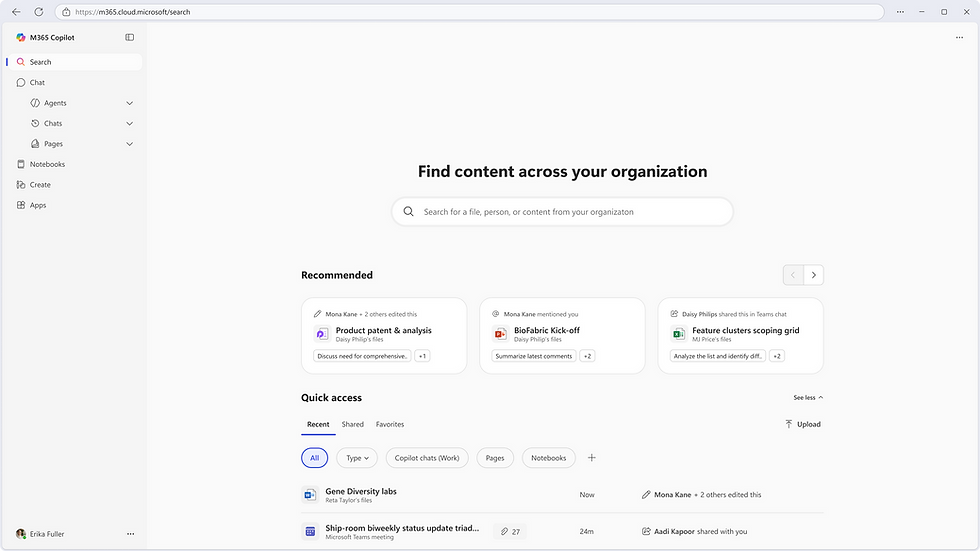
How Copilot Search Works with Microsoft 365 Copilot
Copilot Search is integrated into the Microsoft 365 Copilot app as a dedicated Search module. This integration makes Copilot Search:
Comprehensive: A universal search experience that allows users to search across all their Microsoft 365 and third-party data sources to find what they need quickly.
Fast: Delivers rapid responses at scale across your organizational content.
Relevant: Uses semantic understanding for highly contextual and precise results.
Simple: Features an intuitive, modern user experience.
Connected: Copilot answers and summaries link Search to Chat.
Personalized: Tailored to individual users and tenants.
Secure: Offers enterprise-grade security and privacy.
This design positions search as the organizing layer for AI, while chat remains the workspace for task execution and deeper interactions. For example, if a user searches for what's the status of the Q2 report, Copilot Search may return a summarized answer and offer to continue the conversation in chat for more nuanced exploration or follow-up actions.

Access and Eligibility
Copilot Search is available to users with an eligible Microsoft 365 Copilot license at no additional cost. It can be accessed through the Microsoft 365 Copilot app on desktop, web, and mobile platforms. The app is available to users with Entra accounts (work or school).
No action is required by admins or users to set up Copilot Search. If a user has an eligible Microsoft 365 Copilot license, Copilot Search appears as a tab in the Microsoft 365 Copilot app.
Privacy and Security
Microsoft 365 Copilot Search adheres to the same data protection, privacy standards, and security configurations as Microsoft 365 Copilot.
Natural Language Search
Copilot Search supports natural language queries. Users can type questions or requests in everyday language. For example, you can search for, show me emails from John about Q4 forecasting sent last week or where is the spreadsheet that breaks down marketing ROI by region? Copilot Search will understand your intent and return relevant results from across Microsoft 365, including emails, files, chats, meetings, and more.
Copilot Search goes beyond keyword matching. It uses AI to interpret context, relationships, and meaning, helping you find what you need faster and more intuitively. It also supports traditional keyword queries for specific words or short phrases, relying on exact or partial matches. However, a natural language query can engage AI to better interpret the context of the query, leading to more relevant results.
Answer Types
A Copilot Answer in Microsoft 365 Copilot Search is a concise, AI-generated response powered by Microsoft 365 Copilot Chat. It appears at the top of the search results page when you enter specific natural language queries.
Copilot Answers may include references and information from external sources, including optional connected cloud-backed services and the web. Its grounding is consistent with the grounding you've enabled for Copilot Chat.
Copilot Search also allows admins to curate answers that provide concise, authoritative results relevant to your organization. These answers are delivered directly in search results and convey information about your organization's acronyms, bookmarks, and people.
Acronyms: Define terminology used in the workplace.
Bookmarks: Promote key resources in your organization.
People: Surface coworkers' roles and show how they fit into the organization.
How is Microsoft 365 Copilot Search Different from Microsoft 365 Copilot Chat?
The following table shows some key differences between Microsoft 365 Copilot Search and Microsoft 365 Copilot Chat.
| Feature | Microsoft 365 Copilot Search | Microsoft 365 Copilot Chat |
|------------------|------------------------------|-----------------------------|
| Best for | Find what you need quickly | Generate deeper answers, create content, and get tasks done |
| Interaction style | Query-based (search box) | Conversational (chat-based) |
| Data sources | Microsoft Graph & third-party connectors | Microsoft Graph, third-party connectors, web |
| Security & Privacy | Enterprise-grade security and privacy | Same baseline security; sensitivity labels in UX |
| Integrations | Native Edge integration | Native Edge integration |
How is Microsoft 365 Copilot Search Different from Microsoft Search?
The following table summarizes key comparisons between Microsoft 365 Copilot Search (Paid) and Microsoft Search (Free), focusing on the most relevant features:
| Feature/Capability | Microsoft Copilot Search (Paid) | Microsoft Search (Free) |
|---------------------|----------------------------------|--------------------------|
| UI Entry Point | Microsoft 365 Copilot App (Web, Desktop, Mobile) | Microsoft 365 Copilot App (Web, Desktop, Mobile) |
| User Eligibility | Requires Microsoft 365 Copilot license | Available to unpaid Entra ID users |
| Search Experience | AI-powered, semantic search; universal search across M365 & non-M365 sources | Keyword-based search; interleaved results |
| Integration with Copilot Chat | Deep integration with Chat —via Copilot Chat answers | No integration |
| Future Updates | Document-level AI summary, enhanced people search | N/A |
Conclusion
Microsoft 365 Copilot Search is a powerful tool that enhances the search experience within your organization. It combines AI capabilities with a user-friendly interface, allowing you to access relevant information quickly and securely. Whether you're looking for documents, emails, or insights, Copilot Search provides a comprehensive solution tailored to your needs.
For more information, visit the official Microsoft page: Microsoft 365 Copilot Search.


Comments